
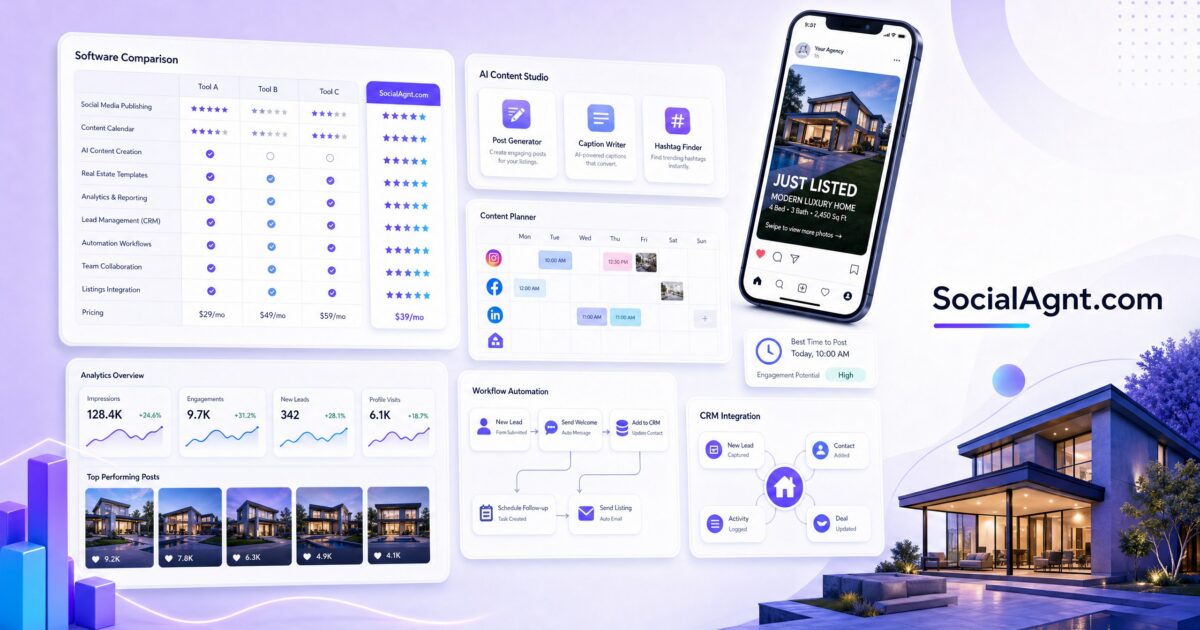
Key Takeaways: The right real estate social media tools can turn a chaotic, time-consuming content process into a streamlined system that runs in the background while you focus on selling homes. But with hundreds of tools on the market — schedulers, content creators, analytics dashboards, CRM integrations, video editors, and AI assistants — choosing the wrong stack wastes money and adds complexity without results. This guide is a comprehensive, honest comparison of the best social media tools and software for real estate agents in 2026, covering what each tool does, what it costs, who it’s best for, and how to build a tech stack that actually makes your marketing easier and more effective.
Why Real Estate Agents Need Specialized Social Media Tools
General social media management tools — the ones built for any business in any industry — can technically work for real estate agents. You can schedule posts with Buffer, design graphics in Canva, and track analytics in Sprout Social. But you’ll spend hours adapting generic templates, manually pulling listing data, and building workflows that a real estate-specific tool would handle automatically.
The real estate social media workflow has unique requirements that generic tools don’t address. You need to create content around specific property listings that change constantly. You need to localize content to specific neighborhoods and markets. You need to maintain compliance with fair housing advertising guidelines. You need to generate leads — not just engagement — and connect those leads to a real estate CRM. And you need to do all of this while also showing homes, writing contracts, and managing closings.
The best social media tools for real estate agents are built specifically for this workflow. They integrate with MLS data, offer real estate-specific templates and content, understand the compliance requirements, and are designed for the unique rhythm of a real estate business. Using the right tools doesn’t just save time — it produces better results because the tools are designed for exactly what you’re trying to accomplish.
Categories of Social Media Tools for Real Estate
Before comparing specific products, it helps to understand the categories of tools you might need. Most agents don’t need one tool from every category — they need a core stack of two to four tools that work together to cover their most important needs.
Social Media Scheduling and Management Platforms
These are the command centers of your social media operation. They let you plan, create, schedule, and publish content across multiple platforms from a single dashboard. Instead of logging into Instagram, Facebook, TikTok, LinkedIn, and YouTube separately, you manage everything in one place.
The best scheduling platforms for real estate offer: multi-platform publishing (posting to several networks simultaneously), content calendars for visual planning, post customization per platform (since what works on LinkedIn doesn’t always work on TikTok), optimal timing recommendations, team collaboration features if you work with an assistant or marketing coordinator, and analytics to track performance across channels.
Content Creation and Design Tools
These tools help you create the visual content that populates your social media feeds — graphics, carousels, video thumbnails, listing announcements, market update visuals, and branded templates. For real estate agents who aren’t graphic designers (which is most of them), these tools are essential for maintaining a professional visual presence.
Video Editing Tools
With video dominating every social media platform — Reels on Instagram, TikTok, YouTube Shorts, and video posts on Facebook and LinkedIn — real estate agents need accessible video editing tools that can turn raw footage into polished content without requiring a film degree.
AI Content Generation Tools
AI writing and content generation tools can help you create captions, blog posts, listing descriptions, email newsletters, and social media content faster. The best ones are trained on or customizable for real estate-specific language and marketing.
Analytics and Reporting Tools
Beyond the native analytics each platform provides, dedicated analytics tools can aggregate data across all your social channels, track trends over time, benchmark your performance against competitors, and connect social media metrics to business outcomes like leads and closings.
CRM and Lead Management Integration
The tools that connect your social media activity to your lead management system — ensuring that every DM conversation, form submission, and lead magnet download flows into your CRM where it can be tracked, nurtured, and converted.
Social Media Management Platforms Compared
Here’s an honest comparison of the leading social media management platforms for real estate agents, covering what they do well, where they fall short, and who they’re best suited for.
SocialAgnt
SocialAgnt is the only social media management platform built specifically for real estate agents. That specialization makes a meaningful difference in the day-to-day experience of using the tool.
What it does well: SocialAgnt supports scheduling across Instagram, Facebook, TikTok, LinkedIn, YouTube, and Google Business Profile from a single dashboard. Its AI-powered caption generator is trained specifically on real estate content, so the captions it produces sound natural for the industry rather than generic. The platform includes MLS integration, which means you can create listing content directly from your MLS data without manually entering property details. It offers a library of real estate-specific templates for listing announcements, market updates, just-sold posts, open house promotions, and testimonial graphics. The content calendar provides a visual overview of your posting schedule across all platforms.
Best for: Real estate agents at any production level who want an all-in-one platform designed for their specific needs. Particularly strong for agents who are managing their own social media without a marketing team and need the efficiency of real estate-specific templates, MLS integration, and AI content that understands their industry. The pricing is competitive with general-purpose tools while offering significantly more relevant features.
Hootsuite
Hootsuite is one of the oldest and most established social media management platforms, serving businesses across every industry.
What it does well: Hootsuite supports a wide range of social networks and offers robust scheduling, monitoring, and analytics features. Its team collaboration tools are strong — if you have a marketing assistant or a brokerage marketing department, Hootsuite makes it easy to manage approvals and workflows. The platform’s social listening features let you monitor mentions of your name, brokerage, or market across social media.
Where it falls short for real estate: Hootsuite is a general-purpose tool with no real estate-specific features. There’s no MLS integration, no real estate templates, and no industry-specific AI content generation. You’ll need to create all content from scratch or import it from other tools. The pricing has also increased significantly in recent years, with the Professional plan starting at $99/month — which can be hard to justify for a solo agent when real estate-specific alternatives exist at lower price points.
Best for: Agents or brokerage marketing teams who are already comfortable with Hootsuite and use its advanced monitoring and team features. Less ideal for individual agents who need real estate-specific functionality out of the box.
Buffer
Buffer has long been a favorite for its simplicity and ease of use. It does less than Hootsuite, but it does what it does cleanly and affordably.
What it does well: Buffer’s interface is remarkably intuitive — you can learn the platform in minutes. Scheduling posts across multiple platforms is straightforward. The analytics dashboard is clean and easy to understand. Buffer also offers a built-in landing page builder (Start Page) that can serve as a simple link-in-bio page.
Where it falls short for real estate: Like Hootsuite, Buffer is a general-purpose tool with no real estate features. No MLS integration, no property templates, no industry-specific content suggestions. Buffer also has more limited platform support compared to some competitors — for example, its TikTok and Google Business Profile integrations have historically been more limited than dedicated real estate tools. The analytics, while clean, are relatively basic compared to platforms that offer deeper insights.
Best for: Agents who value simplicity above all else and don’t need real estate-specific features. Good as a lightweight scheduling tool if you’re creating all your content elsewhere.
Later
Later started as an Instagram-first scheduling tool and has expanded to support other platforms. Its strength is visual planning — the drag-and-drop visual calendar and Instagram grid preview are standout features.
What it does well: Later’s visual content calendar is one of the best in the market. You can see exactly how your Instagram grid will look before posting, which is valuable for agents who care about visual brand consistency. The platform supports Instagram, Facebook, TikTok, Pinterest, LinkedIn, and Twitter. Later also offers Linkin.bio, a tool that turns your Instagram feed into a clickable landing page — useful for driving traffic from Instagram posts to listing pages or lead magnets.
Where it falls short for real estate: Later’s strength is visual planning, but it lacks real estate-specific features. No MLS integration, no listing templates, and the AI caption generator is trained on general marketing content. The platform is also most powerful for Instagram-heavy strategies — if your primary platforms are Facebook and LinkedIn, other tools may serve you better.
Best for: Visually-oriented agents whose primary focus is Instagram and who want precise control over their grid aesthetic.
Why adapt a generic tool when you can use one designed for your business? SocialAgnt gives you MLS integration, real estate templates, AI captions trained on your industry, and multi-platform scheduling across Instagram, Facebook, TikTok, LinkedIn, YouTube, and Google Business Profile — all in one dashboard. Start free today.
Content Creation Tools for Real Estate
Canva
Canva has become the default design tool for non-designers, and for good reason. Its drag-and-drop interface, massive template library, and free tier make it accessible to virtually anyone.
For real estate agents: Canva offers some real estate templates, but they tend to be generic and overused — you’ll see the same templates on dozens of agents’ feeds in your market. The brand kit feature (available on Canva Pro at $13/month) lets you save your brand colors, fonts, and logos for consistent design. The bulk creation feature can speed up producing multiple listing graphics. Canva’s integration with some scheduling tools means you can design and schedule in a connected workflow.
Limitation: Canva is a design tool, not a social media management tool. You’ll still need a separate platform for scheduling, analytics, and multi-platform publishing. This adds complexity and cost to your tech stack.
Adobe Express
Adobe Express (formerly Adobe Spark) is Adobe’s answer to Canva — a simplified design tool that leverages Adobe’s design heritage. It offers templates, brand kits, AI-powered design suggestions, and integration with the broader Adobe ecosystem.
For real estate agents: If you already use Adobe products (Photoshop, Lightroom, Premiere Pro), Adobe Express fits neatly into your workflow. The AI background removal and resize features are useful for creating listing graphics quickly. However, like Canva, it’s a design tool that requires a separate scheduling platform.
Video Editing Tools for Real Estate
CapCut
CapCut (made by ByteDance, TikTok’s parent company) has become the go-to video editing tool for short-form content creators, including many real estate agents. It’s free, powerful, and optimized for the kind of videos that perform well on TikTok and Instagram Reels.
For real estate agents: CapCut offers auto-captions (essential for accessibility and silent viewing), trending effects and transitions, an extensive music library, and templates you can customize with your own footage. The learning curve is gentle — most agents can produce polished listing tours and market update videos after a few hours of practice. The desktop version adds more advanced editing capabilities when you need them.
InShot
InShot is a mobile-first video editor that’s simpler than CapCut but still capable enough for most real estate video content. It’s particularly good for quick edits — trimming clips, adding music, applying filters, and exporting in the right format for each platform.
For real estate agents: InShot is ideal for agents who want to edit videos on their phone immediately after filming — while sitting in a car after a showing, for example. It’s fast, intuitive, and produces clean results without a steep learning curve.
Descript
Descript is a unique video editing tool that lets you edit video by editing text. It transcribes your video, and you edit the transcript — deleting words removes those segments from the video. This text-based editing approach is particularly powerful for talking-head videos like market updates and educational content.
For real estate agents: If you create a lot of videos where you’re speaking to camera (market updates, buyer tips, neighborhood overviews), Descript can dramatically speed up your editing. Remove filler words (“um,” “uh”) with one click. Cut out tangents by deleting sentences from the transcript. Add captions automatically. The AI features can even clone your voice for corrections. Starting at $24/month, it’s an investment — but for agents who publish weekly video content, the time savings justify the cost.
AI Content Generation Tools for Real Estate
AI writing tools have evolved dramatically, and in 2026 they’re a practical part of many agents’ content workflows. They won’t replace your expertise and personality, but they can significantly speed up content creation when used as a starting point rather than a finished product.
ChatGPT
OpenAI’s ChatGPT is the most widely used AI writing tool. For real estate agents, it can generate caption drafts, listing descriptions, blog post outlines, email templates, and social media content ideas. The key is giving it specific, detailed prompts that include your market, target audience, brand voice, and the specific topic you want to cover.
Limitation: ChatGPT’s output is generic by default. Without careful prompting and editing, your content will sound like every other agent using AI. Always rewrite AI-generated content in your voice and add your personal perspective, local knowledge, and specific data.
Platform-Integrated AI
Many social media management platforms now include built-in AI caption generators. SocialAgnt’s AI is trained specifically on real estate content, which means the initial output is more relevant and requires less editing than a general-purpose AI tool. This integration also means you don’t need to switch between tools — you can generate, edit, and schedule content in one workflow.
Building Your Ideal Tech Stack
You don’t need every tool on this list. In fact, too many tools create more complexity than they solve. The goal is a lean, efficient stack that covers your core needs without overlapping functionality or breaking the bank.
The Essential Stack for Solo Agents
If you’re a solo agent managing your own social media, your core stack should include one social media management platform with scheduling, templates, and analytics (this is your hub — everything flows through here), one video editing app for creating Reels, TikToks, and video content, and a CRM that integrates with your social platforms to capture and nurture leads. For most solo agents, a real estate-specific platform like SocialAgnt combined with CapCut for video editing and your existing CRM covers everything you need. Total investment: under $50/month plus your CRM cost.
The Power Stack for Teams and Top Producers
If you’re a team leader or top-producing agent with marketing support, you might add Canva Pro for advanced design capabilities beyond your scheduling platform’s templates, Descript for professional video editing on market update and educational content, an advanced analytics tool for deeper performance insights and competitive benchmarking, and a more sophisticated CRM with marketing automation (like Follow Up Boss or kvCORE) that integrates lead capture from social media with automated nurture campaigns.
The Brokerage Stack
If you’re managing social media for an entire brokerage, you need tools that support multiple users, approval workflows, brand compliance, and scalable content distribution. Look for platforms that offer team management features, shared content libraries, brand guidelines enforcement, and per-agent analytics — so you can maintain brand consistency while giving individual agents the ability to customize content for their personal brand.
How to Evaluate Any Social Media Tool
Before committing to any tool, evaluate it against these criteria that matter most for real estate agents:
Platform coverage: Does it support all the social networks you use? At minimum, you need Instagram, Facebook, and one other platform. Ideally, you want TikTok, LinkedIn, YouTube, and Google Business Profile support as well — the broader your distribution, the more leads you capture.
Real estate relevance: Does it offer features specifically designed for real estate — MLS integration, property templates, compliance features, real estate-specific AI? General tools work, but specialized tools work faster and produce better results for your specific use case.
Ease of use: How quickly can you learn the tool and integrate it into your workflow? A powerful tool that you never use because it’s too complicated provides zero value. Prioritize tools that you’ll actually use consistently over tools that have the most features on paper.
Time savings: How much time does the tool save you per week compared to your current process? If a tool saves you three hours per week and costs $30/month, that’s $10 per hour saved — almost certainly worth it. Calculate the real time savings before subscribing.
Integration capability: Does it connect with your other tools — your CRM, your email marketing platform, your website? Disconnected tools create manual work (exporting data from one system and importing into another). Connected tools create automated workflows.
Cost vs. value: Don’t just look at the monthly price — look at the total cost of your social media stack and the value it produces. A $50/month tool that generates five leads per month is vastly more valuable than a $20/month tool that generates one. Track your cost per lead by tool to make informed spending decisions.
Common Mistakes When Choosing Social Media Tools
Subscribing to too many overlapping tools. Many agents accumulate subscriptions over time — a scheduling tool here, a design tool there, an AI writer, a separate analytics dashboard. Before adding a new tool, check whether your existing tools already cover that functionality. Consolidation saves money and reduces the cognitive overhead of managing multiple platforms.
Choosing based on features you’ll never use. Enterprise-grade tools with advanced features are appealing on demo calls, but if you’re a solo agent, you’ll use maybe 20% of what an enterprise platform offers. Choose tools scaled to your actual needs and upgrade when your needs grow.
Ignoring the learning curve. A tool is only valuable if you use it consistently. If a platform takes weeks to learn and you abandon it after the trial period, you’ve wasted time and money. Prioritize tools with intuitive interfaces and good onboarding — or allocate specific time to learn a more complex tool before committing.
Not tracking ROI. Every tool in your stack should contribute to either saving time (measured in hours per week) or generating results (measured in leads, engagement, or revenue). If a tool has been in your stack for three months and you can’t articulate the specific value it provides, it’s time to cancel and reallocate that budget.
Letting tools replace strategy. The best social media tool in the world can’t compensate for a lack of strategy. Tools are execution accelerators — they make your strategy more efficient. If you don’t know what to post, who you’re targeting, or what your goals are, no tool will fix that. Get your strategy right first, then choose tools that help you execute it.
SocialAgnt combines scheduling, AI content creation, real estate templates, MLS integration, and multi-platform publishing into a single dashboard built exclusively for real estate agents. Stop paying for five generic tools when one specialized platform does it all. Start your free account today.
Your Tool Selection Action Plan
Step 1 — Audit your current stack. List every social media-related tool you’re currently paying for, including free tools you use regularly. Note the monthly cost, what you use it for, and how much time you spend in it each week. Identify overlaps and gaps.
Step 2 — Define your requirements. What platforms do you need to manage? What content types do you create most (graphics, video, text)? Do you need team collaboration features? What’s your monthly budget for social media tools? Write down your must-haves versus nice-to-haves.
Step 3 — Test before you commit. Most social media tools offer free trials. Use them. But test with intent — don’t just click around the interface. Spend the trial period actually creating and scheduling content, pulling analytics, and integrating with your other systems. Evaluate the tool based on your real workflow, not a curated demo.
Step 4 — Consolidate and optimize. Choose your core stack (ideally two to three tools maximum), cancel everything else, and commit to learning your chosen tools deeply. An agent who masters one platform will always outperform an agent who dabbles in five. Invest time in learning keyboard shortcuts, automation features, and advanced capabilities that save time over the long term.
The right social media tools don’t just make posting easier — they make your entire marketing operation more consistent, more professional, and more effective at generating the leads that drive your business. Choose tools that match your strategy, learn them thoroughly, and let them handle the execution while you focus on what you do best: serving your clients and closing deals.
Ready to save 5+ hours per week on social media?
SocialAgnt helps real estate agents schedule posts, create AI content, and grow their brand across 7 platforms. Try it free for 14 days.
